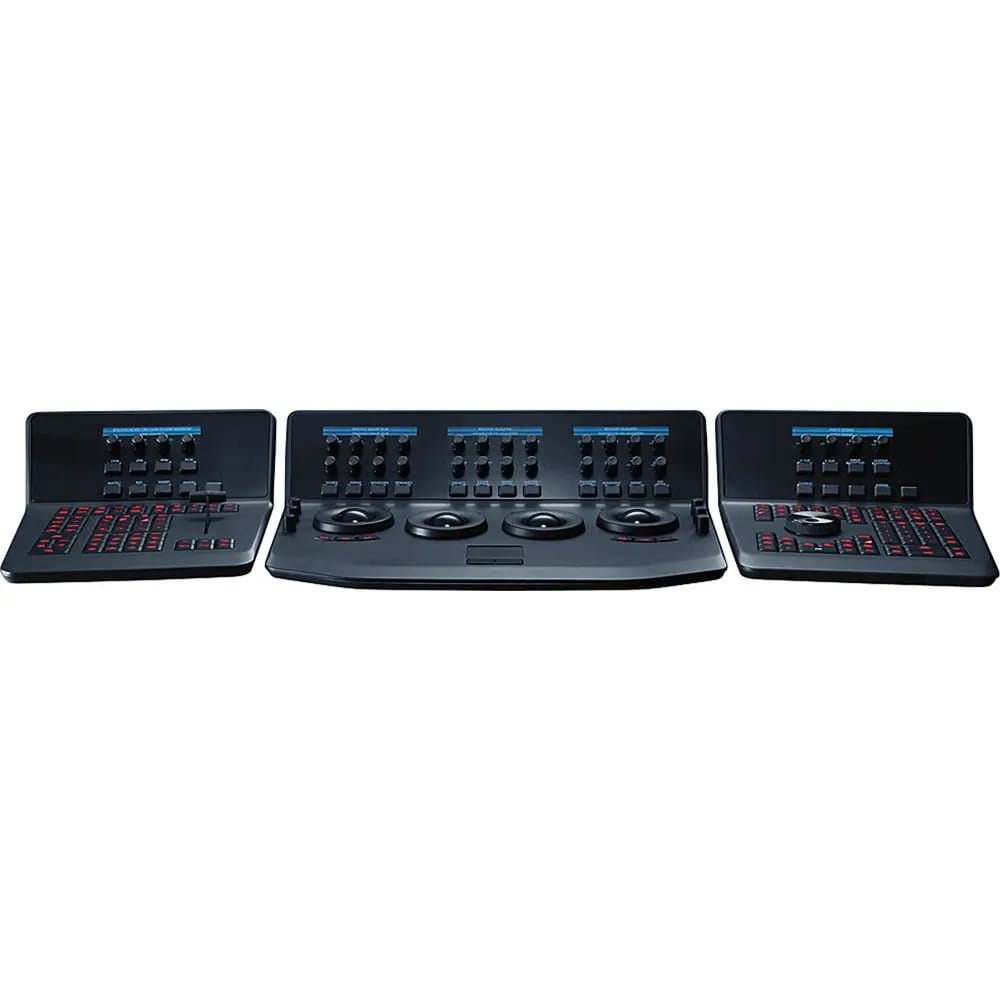
Blackmagic Design DaVinci Resolve Advanced Panel
4,606,450 TK
Out of stock
This item is temporarily unavailable for purchase.
Warranty
1 Year Official Warranty - 12 months coverage
ডেলিভারি / Delivery
- Inside Dhaka · 1–2 দিন · 100 TK
- Outside Dhaka · 2–5 দিন · 150 TK
- Collect From Store · ফ্রি
Out of stock

Key Features
Control Surface for Resolve Controls
T-Bar Panel and Transport Panel
Slide-Out Keyboard, Reference Keys
RGB Lift, Gamma, Gain Trackballs
Node-Based Real-Time Image Processing
32-Bit Floating Point/YRGB Processing
5 x LCDs with Real-Time Key Information
30 x Soft Knobs, Illuminated Keys
Jog/Shuttle Knob and Transport Controls
Compatible with Mac, Linux, Windows
Share
The DaVinci Resolve Advanced Panel from Blackmagic Design is a significant step up in functionality from the Micro or Mini panel. It consists of a main console and two auxiliary consoles, one on each side, as well as a slide-out keyboard in the center console. It enables one-touch access to virtually every control and parameter within the DaVinci Resolve software.
The DaVinci Resolve Advanced Panel from Blackmagic Design is a significant step up in functionality from the Micro or Mini panel. It consists of a main console and two auxiliary consoles, one on each side, as well as a slide-out keyboard in the center console. It enables one-touch access to virtually every control and parameter within the DaVinci Resolve software.
The center console incorporates four high-resolution, weighted trackballs and 30 soft, customizable control knobs for accessing color-correction tools in the Resolve software. The custom control knobs feature 4096 steps per rotation and push-button reset so you can achieve high-quality and precise color correction using the DaVinci Resolve system.
The Resolve control surface incorporates a slide-out keyboard that is useful when naming or renaming files, and it can be neatly tucked away when not in use. All functions are accessible via separate keys, such as the reference keys, and the fader T-bar that allows you to wipe between reference stills.
You can easily control the image sections via keys located for easy access at your natural hand positions. Lift, gamma, and gain adjustments along with RGB control are achieved via trackballs. Menus and indicators are visible via five high-resolution LCD screens that offer a view of the functions of all the knobs and buttons. Soft knobs that can precisely control parameters via single touch are provided, and no electrical contact eliminates wearing out of the knobs. Aesthetically illuminated keys are backlit using RGB color and intensity. Complete control of the project timeline or deck is offered via the jog/shuttle knob and transport controls.
All Resolve panels have soft keys and variable control knobs within the LCD panel, which provide an accurate visual reference to the control without the risk of error.
The center panel has four trackballs, each with a surrounding control ring. The three trackballs to the left control lift, gamma, and gain when Resolve is set for primary grading. When in Log grading, they adjust lowlights, mid-tones, and highlights. The fourth trackball works similar to a mouse for moving the on-screen cursor. It can also be used to draw Power Windows, control color curve point position, and act as an offset control for the primary grade.
The center panel incorporates a slide-out keyboard that is useful when naming or renaming files, and it can be neatly tucked away when not in use.
Y lift control: Adjust the contrast of the image in the darker areas, specifically in the Y (luminance) channel only. This adjustment allows for changing the black point without changing saturation.
Y gamma control: Adjust the contrast of the image in the mid-tone areas, specifically in the Y (luminance) channel only. This control helps add depth and extra vibrancy to shots.
Y gain: You can reduce hot spots or tweak the whites to define a look.
Contrast control: Increase contrast to make the blacks darker and the whites brighter, or decrease contrast to do the opposite.
Pivot: Change the center of tonality about which dark and bright parts of the image are stretched or narrowed during a contrast adjustment.
Mid-tone detail: Affect the contrast of regions of the image with high edge detail to increase or decrease the perception of image sharpness and definition. It's often used for softening facial features, making it popular for beauty shots.
Color boost control: Raise the saturation in regions of the image with low saturation while leaving properly saturated areas alone. Also known as a vibrance operation, this is useful for adding color without oversaturating the image.
Shadow control: Selectively lighten or darken shadow detail without affecting your image's mid-tones.
Highlight control: Enable retrieving blown-out highlight detail in high dynamic range media by lowering this parameter. This allows you to achieve a smooth blend between the retrieved highlights and unadjusted mid-tones, for a natural-looking image.
Increases or decreases overall image saturation; you can turn your color image into a grayscale image with this control.
Hue control: Rotates all hues of the image 360° around the color wheel. The default setting is 50, which retains the original distribution of hues.
Luminance mix control: Controls the balance between the YRGB adjustments and Y-only adjustments made using the Y channel lift, gamma, and gain controls.
The panel features a T-bar mix/wipe control and a number of menu and function keys. You can position the T-bar panel on either side of the Trackball panel.
The Transport panel features the timeline transport controls and a jog/shuttle control, as well as a numerical keypad and associated function keys. The Transport panel can be positioned on either side of the Trackball panel.
System requirements as of DaVinci Resolve 18:
macOS 11 Big Sur
8GB of system memory. 16GB when using Fusion
Blackmagic Design Desktop Video version 12.0 or later
Integrated GPU or discrete GPU with at least 2GB of VRAM
GPU that supports Metal or OpenCL 1.2
Windows 10 Creators Update
16GB of system memory. 32GB when using Fusion
Blackmagic Design Desktop Video 10.4.1 or later
Integrated GPU or discrete GPU with at least 2GB of VRAM
GPU that supports OpenCL 1.2 or CUDA 11
NVIDIA/AMD/Intel GPU Driver version–as required by your GPU
CentOS 7.3
32GB of system memory
Blackmagic Design Desktop Video 10.4.1 or later
Discrete GPU with at least 2GB of VRAM
GPU that supports OpenCL 1.2 or CUDA 11
NVIDIA/AMD Driver version–as required by your GPU
Questions & Answers
What is the latest Blackmagic Design DaVinci Resolve Advanced Panel price in Bangladesh?
The latest Blackmagic Design DaVinci Resolve Advanced Panel price in Bangladesh is 4,606,450 TK. Price may change based on stock, offer, and supplier update.
Where can I find the current Blackmagic Design Blackmagic Design DaVinci Resolve Advanced Panel price in Bangladesh?
Camera Bazar lists the current Blackmagic Design Blackmagic Design DaVinci Resolve Advanced Panel price in Bangladesh as 4,606,450 TK, with availability depending on stock and offer updates.
Blackmagic Design DaVinci Resolve Advanced Panel এর দাম কত?
Blackmagic Design DaVinci Resolve Advanced Panel এর বর্তমান দাম 4,606,450 TK। স্টক ও অফারের উপর দাম পরিবর্তন হতে পারে।
Where can I buy Blackmagic Design Blackmagic Design DaVinci Resolve Advanced Panel in Bangladesh?
You can buy Blackmagic Design Blackmagic Design DaVinci Resolve Advanced Panel from Camera Bazar online or from Camera Bazar showrooms in Bangladesh, subject to availability.
Is Blackmagic Design DaVinci Resolve Advanced Panel available now?
Blackmagic Design DaVinci Resolve Advanced Panel is currently out of stock at Camera Bazar. Availability can change, so confirm stock before ordering.
What are the key specifications of Blackmagic Design DaVinci Resolve Advanced Panel?
Key specifications include Control Surface: Yes, T-Bar Panel: Included, Transport Panel: Included, Slide-Out Keyboard: Yes. See the specifications table on this page for full details.